Below are links that we hope you will enjoy and find useful.
The buttons below open websites where you can listen to the Bible study live without an HF radio. Directions for the Half Moon Bay receiver are in the picture below. The Utah receiver is set up the same way. With the Montana SDR, all you need to do is hit play and enter the frequency.
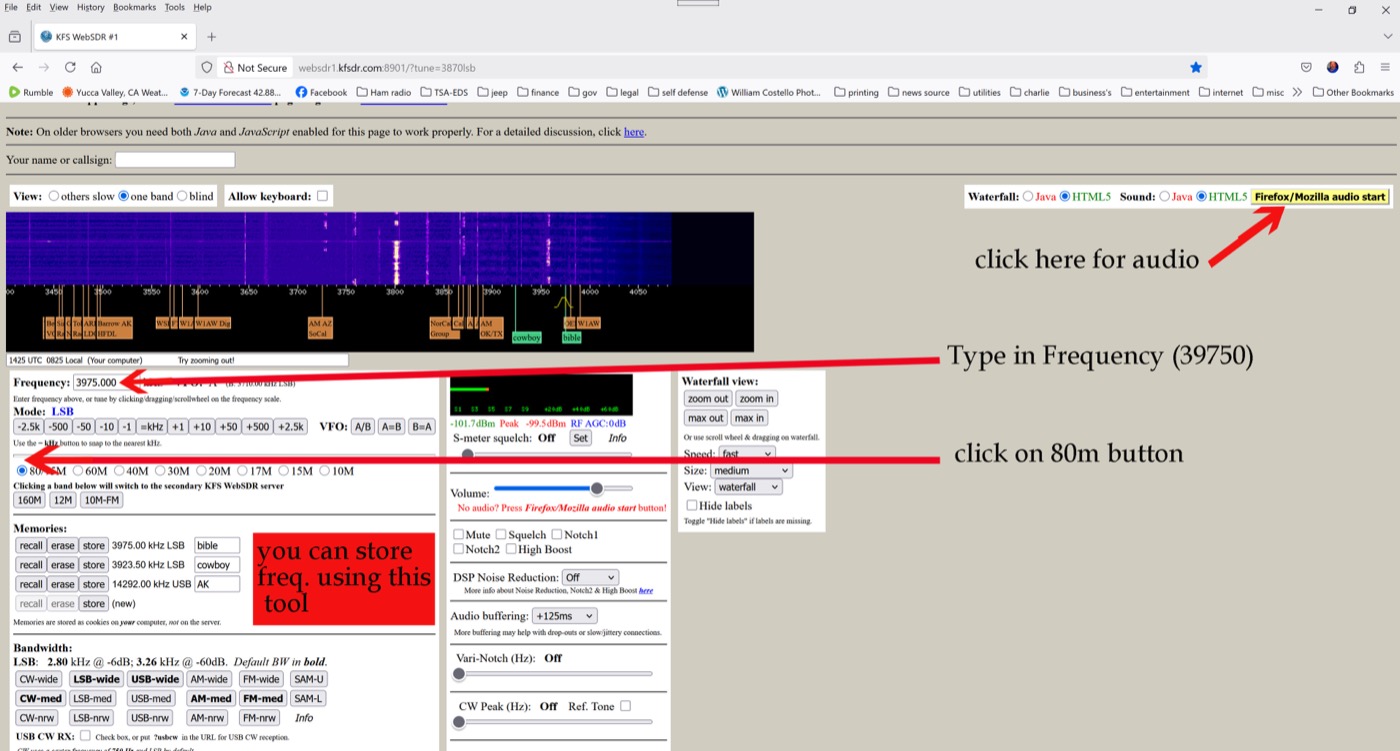
How to use the web receivers
The Half Moon Bay and Northern Utah receivers are the same family of web-SDR front ends. Once the page loads:
- Make sure your browser has JavaScript enabled.
- Type the frequency in (for our net: 3.975 MHz, LSB).
- Click on the 80 m band button so the waterfall centers correctly.
- Click here for audio (the start-audio control) to hear the band.
- You can store the frequency in the receiver's memory for next time.
Montana SDR: no directions needed — hit play, enter the frequency, and listen.
Archives
Past studies — full transcripts, summaries, and recordings — are kept in the WCBS archives.